Making a call
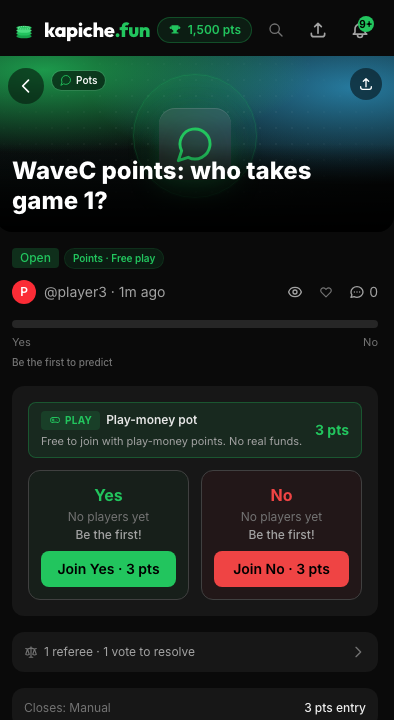
Making a call is how you take a position: you pick a side of a pot and commit your stake behind it.
A position is two things together: the side you pick (Yes, No, or one of the listed options) and the stake you commit (points or USDC). Until a pot closes you can see the sides; once you confirm a call, you are on the record for that pot.
How it works
Open a pot
Pick your side
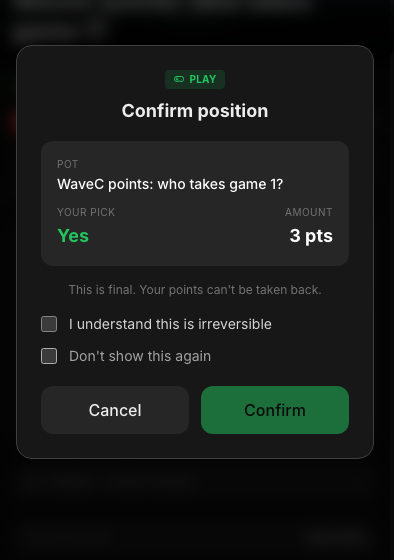
Confirm the entry stake
Confirm
Calls are final
Calling with points
On a public points pot you commit free points. The confirm modal shows the side and the points amount (for example "120 pts"), never a dollar sign, because points are play money for fun and reputation. Win or lose, the result updates your Oracle accuracy.
Calling with real money
On a private real-money pot you commit your own USDC, shown with a dollar sign. The confirm step spells out that settlement is peer-to-peer with no escrow: kapiche never holds or moves your money. You will need to be 18+ with a funded wallet. See Real money with friends for the full picture.
Picking before you sign up
You do not have to be logged in to pick a side. If you tap a call while logged out, kapiche saves your intended pick and walks you through a quick signup, then drops you right back on the confirm step so nothing is lost.
Your pick is saved
The side you chose is held through the signup flow, so you finish the exact call you started.
Nothing commits early
No points or USDC move until you reach the confirm step and tap to lock it in.
Where calls show up